Configuration
Deployment
A part of the configuration is done with environment variables, which need to be set when deploying SecObserve. How this is done depends on the deployment method, see Installation.
Backend
| Environment variable | Optionality | Description |
|---|---|---|
ADMIN_USER |
mandatory | Username of the administration user. The user will be created at the fist start of the backend. |
ADMIN_EMAIL |
optional | E-Mail of the administration user. |
ADMIN_PASSWORD |
optional | Initial password of the admin user. If it is not set, a random password will be created during startup and shown in the log. |
ALLOWED_HOSTS |
mandatory | Hostnames of the backend, see Django settings ALLOWED_HOSTS. This can be a comma-separated list of hostnames. |
CORS_ALLOWED_ORIGINS |
mandatory | URL of the frontend that is authorized to make cross-site HTTP requests. This can be a comma-separated list of URLs. |
DATABASE_HOST |
mandatory | Which host to use when connecting to the database. |
DATABASE_DB |
mandatory | The name of the database to use. |
DATABASE_PORT |
mandatory | The port to use when connecting to the database. |
DATABASE_USER |
mandatory | The username to use when connecting to the database. |
DATABASE_PASSWORD |
mandatory | The password to use when connecting to the database. |
DATABASE_ENGINE |
mandatory | The database backend to use. Supported database backends are django.db.backends.mysql and django.db.backends.postgresql |
DATABASE_KEEPALIVES_IDLE |
optional | PostgreSQL only: seconds of inactivity after which TCP keepalive probes are sent on database connections, see libpq keepalives_idle. Default is 30. |
DATABASE_KEEPALIVES_INTERVAL |
optional | PostgreSQL only: seconds between unanswered TCP keepalive probes. Default is 10. |
DATABASE_KEEPALIVES_COUNT |
optional | PostgreSQL only: number of unanswered TCP keepalive probes after which the connection is considered dead. On Linux it is only used if DATABASE_TCP_USER_TIMEOUT_MS is 0, otherwise the TCP user timeout decides. Default is 3. |
DATABASE_TCP_USER_TIMEOUT_MS |
optional | PostgreSQL only: milliseconds that transmitted data or keepalive probes may remain unacknowledged before the connection is closed, see libpq tcp_user_timeout. 0 uses the operating system default. Default is 60000, so with the defaults a connection to an unreachable database server fails after about one minute. |
MYSQL_AZURE |
optional | Must be set if Azure Database for MySQL is used, to use the necessary SSL certificate. For MySQL Flexible Server it needs to have the value flexible, for MySQL Single Server the the value needs to be single. See Connect using mysql command-line client with TLS/SSL and Configure SSL connectivity in your application to securely connect to Azure Database for MySQL. |
DJANGO_SECRET_KEY |
mandatory | A secret key for a particular Django installation. This is used to provide cryptographic signing, and should be set to a unique, unpredictable value with at least 50 characters, see Django settings SECRET_KEY. |
FIELD_ENCRYPTION_KEY |
mandatory | Key to encrypt fields like the JWT secret. See Generating an Encryption Key how to generate the key. |
GUNICORN_WORKERS |
optional | Number of worker processes for the Gunicorn web server, see Gunicorn documentation. Default is 3. |
GUNICORN_THREADS |
optional | Number of worker threads for the Gunicorn web server, default is 10. |
GUNICORN_LIMIT_REQUEST_FIELD_SIZE |
optional | Limits the allowed size of an HTTP request header field, default is 16380. |
OIDC_AUTHORITY |
mandatory | The authority is a URL that hosts the OpenID configuration well-known endpoint. |
OIDC_CLIENT_ID |
mandatory | The client ID is the unique Application (client) ID assigned to your app by the OpenID Connect provider when the app was registered. |
OIDC_USERNAME |
mandatory | The claim that contains the username to find or create the user. |
OIDC_FIRST_NAME |
mandatory | The claim that contains the first name of the user. |
OIDC_LAST_NAME |
mandatory | The claim that contains the last name of the user. |
OIDC_FULL_NAME |
mandatory | The claim that contains the full name of the user. |
OIDC_EMAIL |
mandatory | The claim that contains the email address of the user. |
OIDC_GROUPS |
optional | The claim that contains the groups of the user. |
EMAIL_BACKEND |
optional | Django backend used to send email, see Django settings EMAIL_BACKEND. Default is django.core.mail.backends.smtp.EmailBackend. |
EMAIL_HOST |
optional | Host of the SMTP server used to send email notifications. Default is localhost. Email notifications are only enabled when EMAIL_HOST or EMAIL_PORT is set. |
EMAIL_PORT |
optional | Port of the SMTP server. Default is 1025. |
EMAIL_HOST_USER |
optional | Username used to authenticate against the SMTP server. Default is empty. |
EMAIL_HOST_PASSWORD |
optional | Password used to authenticate against the SMTP server. Default is empty. |
EMAIL_USE_TLS |
optional | true: use a TLS (secure) connection to the SMTP server, false: otherwise. Default is false. |
BACKGROUND_TASKS_TIME_ZONE |
optional | IANA time zone of the hours and minutes of the background tasks in the Settings, e.g. Europe/Berlin. Default is UTC. The backend does not start if the value is not a valid time zone. See Time zone of the background tasks. |
HUEY_STATS_MAX_EVENTS |
optional | Number of events the background task statistics keep per queue. Every task writes one event per signal, so a low value lets a single import that enqueues a task per product push everything else out of the statistics. Default is 100000. |
HUEY_TASK_MAX_RUNTIME_HOURS |
optional | Hours after which a running background task is considered stuck, for example because its worker thread is blocked on a dead database connection. The command check_background_tasks, which the Helm chart uses as liveness probe of the background container, exits with an error when a task has been running for longer. Set it above the longest regular runtime of a task, otherwise that task is killed by the restart before it can finish. Default is 12. |
OSV_MAX_THREADS |
optional | Maximum number of concurrent connections used when fetching vulnerability data from api.osv.dev during an OSV scan. Default is 32. Lower it if the OSV API returns connection resets or SSL errors under load. |
Frontend
| Environment variable | Optionality | Description |
|---|---|---|
API_BASE_URL |
mandatory | URL where to find the backend API, e.g. https:\\secobserve-backend.example.com/api. |
OIDC_ENABLE |
mandatory | true: OpenID Connect authentication is active, false: otherwise. |
OIDC_AUTHORITY |
mandatory | The authority is a URL that hosts the OpenID Connect configuration well-known endpoint. |
OIDC_CLIENT_ID |
mandatory | The client ID is the unique Application (client) ID assigned to your app by the OpenID Connect provider when the app was registered. |
OIDC_REDIRECT_URI |
mandatory | The redirect URI is the URI the identity provider will send the security tokens back to. To be set with the URL of the frontend. |
OIDC_POST_LOGOUT_REDIRECT_URI |
mandatory | The post logout redirect URI is the URI that will be called after logout. To be set with the URL of the frontend. |
OIDC_SCOPE |
optional | OpenID Connect (OIDC) scopes are used by an application during authentication to authorize access to a user's details, like name or email. If the variable is not set, the standard scopes openid profile email will be used. |
OIDC_PROMPT |
optional | The prompt parameter allows to request specific interactions with the user during the authentication process, values can be none, login, consent and select_account. Default is not to set the prompt parameter. |
All the OIDC_* environment variables are needed for technical reasons. If OIDC_ENABLE is set to false, the other OIDC_* environment variables can be set to dummy or something similar.
More about the configuration for different OpenID Connect providers can be found in OpenID Connect authentication.
Administration in SecObserve
Other parts of the configuration are done in the administration interface of SecObserve under Settings, which can only be accessed by users with the role Superuser.
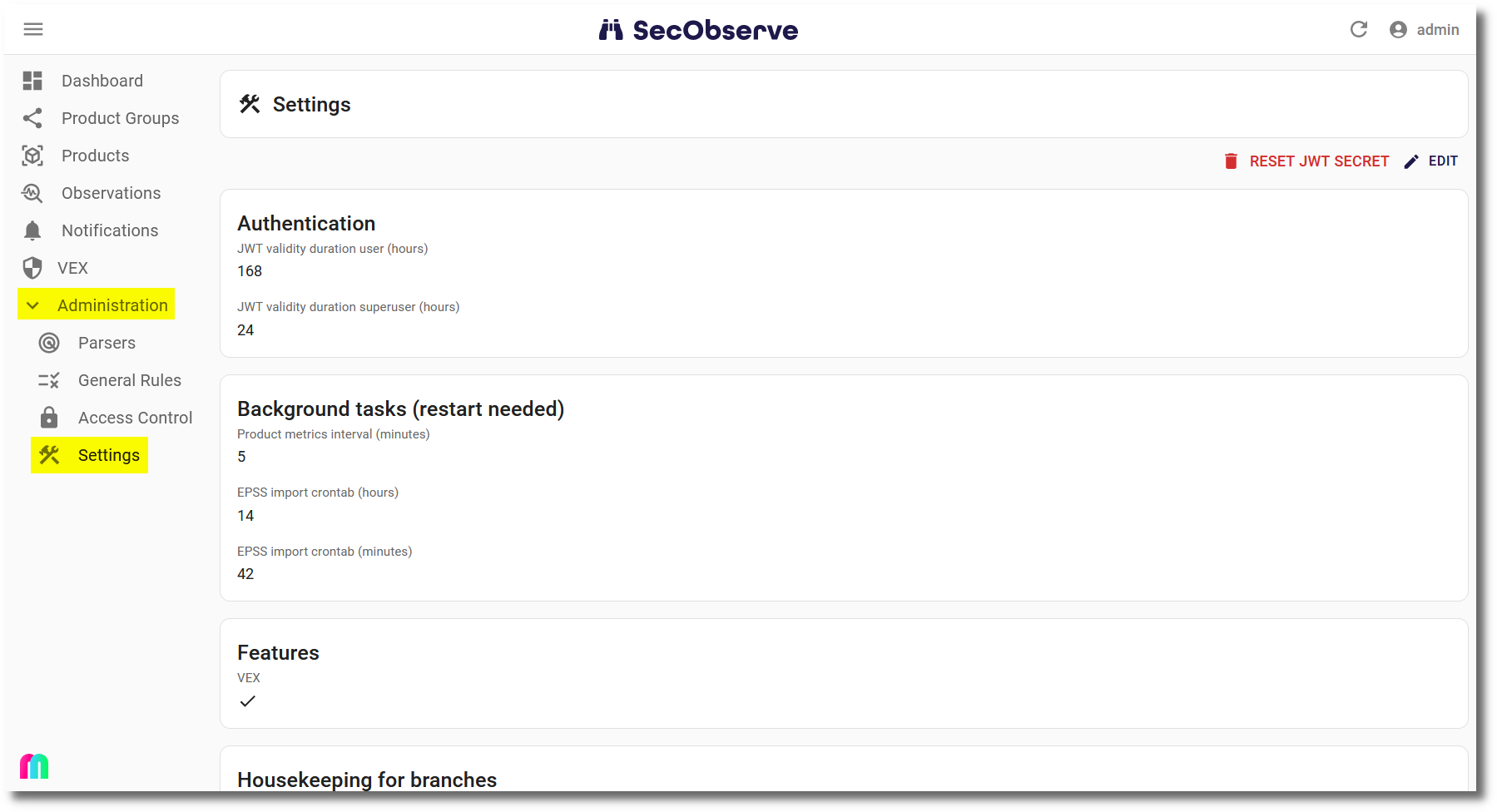
The entries shall be checked and adjusted if necessary after installing SecObserve.
Time zone of the background tasks
The hours and minutes of the background tasks in the section Background tasks are in UTC, unless the environment variable BACKGROUND_TASKS_TIME_ZONE is set to another time zone. The settings show the time zone that is used.
The stored hours are not converted when the time zone is changed, so after the change the tasks run at the same hour on the clock of the new time zone. To change the time zone:
- Set
BACKGROUND_TASKS_TIME_ZONE, e.g. toAsia/Ho_Chi_Minh. - If a task shall keep running at the same time as before, adapt its hour in the section
Background tasks. For example the EPSS import, which runs at 03:00 UTC by default, has to be set to 10:00 inAsia/Ho_Chi_Minh(UTC+7). - Restart the backend, like for every change in the section
Background tasks.
In a time zone with daylight saving time, a task that is scheduled in the hour that is skipped in spring does not run on that day, and a task in the hour that is repeated in autumn runs twice.
Notifications
The settings of the section Notifications are described in more detail in Notifications and Notification channels.
| Setting | Description |
|---|---|
Base URL frontend |
Base URL of the frontend, used to set links in notifications correctly. |
Email from |
From address for sending email notifications. If it is not set, no email notifications are sent at all. |
Comma separated email addresses to send exception notifications |
Email addresses that are notified when an exception occurs. |
MS Teams webhook to send exception notifications |
Webhook URL of the Microsoft Teams channel that is notified when an exception occurs. |
Slack webhook to send exception notifications |
Webhook URL of the Slack channel that is notified when an exception occurs. |
Exception rate limit |
Timedelta in seconds when to send the same exception the next time. Default is 3600 seconds. |
Comma separated email to addresses to send observation title notifications |
Email addresses that are notified about new or changed observation titles. |
Webhook URL to send observation title notifications to MS Teams |
Webhook URL of the Microsoft Teams channel that is notified about new or changed observation titles. |
Webhook URL to send observation title notifications to Slack |
Webhook URL of the Slack channel that is notified about new or changed observation titles. |
Minimum severity for observation title notifications |
An observation title is notified when an observation has at least this severity. |
Statuses for observation title notifications |
An observation title is notified when an observation has one of these statuses. If the list is empty, the 3 active statuses Open, Affected and In review are used. |
Minimum priority for observation title notifications |
An observation title is notified when an observation has at least this priority. |
Parser type for observation title notifications |
An observation title is notified when the parser used for the observation has this type. |
Note
At least one of the 4 attributes for observation title notifications has to be set, otherwise no notifications for observation titles are sent.